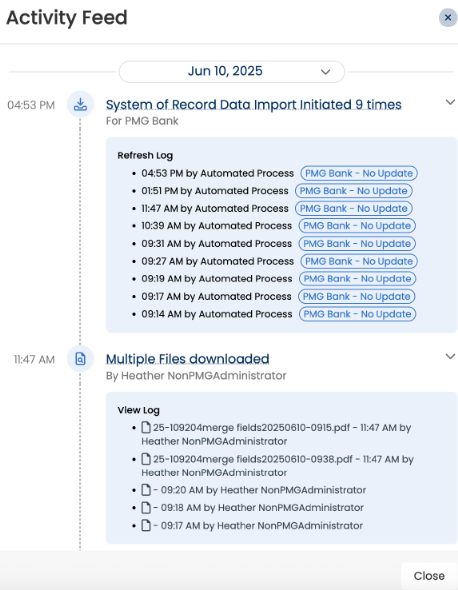
Case Activity
The Case Activity section provides a chronological overview of everything that has happened in a dispute case. It is designed to keep you informed about tasks that require your attention, as well as to maintain a clear history of case-related actions for reference. This section contains the case and the .
Case To Do's
The Case To-Do’s panel displays all tasks associated with a dispute case. This feature helps users stay organized by highlighting pending tasks, while also maintaining a record of completed actions.
Pending: These are tasks that require action before the case can move forward. They remain under the Pending section until they are marked as complete.
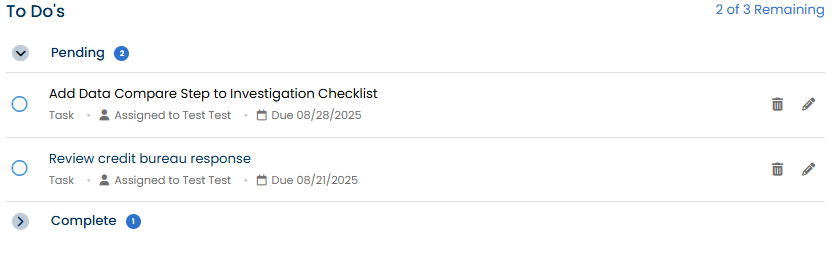
Complete: Once a task has been addressed, it appears under the Complete section.

Case Activity
The presents a timeline of all activities tied to the case. It serves as a logbook, showing both recent and past events to ensure a complete history of case progress is available at a glance.
Typical entries can include actions performed in the system (e.g., “Dispute created,” “Case assigned”), communication logs (e.g., “Call logged), and task status updates etc.
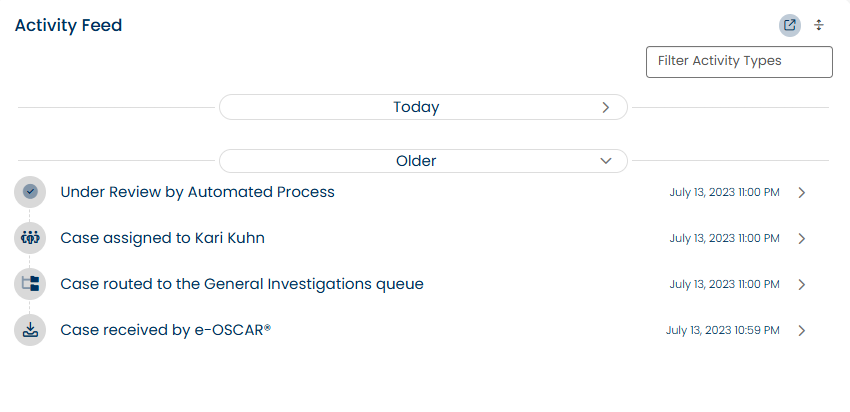
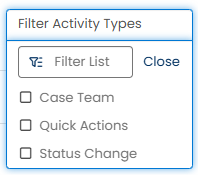
Thecan be filtered by activity type, allowing users to quickly narrow down updates they need to review. Click the Filter Activity Types button to view the filters list including:
Case Team
Quick Actions
Status Changes
Key Features
Grouped Activities - Related actions that occur simultaneously are automatically grouped into a single, expandable entry.
Parent/Child Activity Relationships - When one action triggers another (for example, importing a case triggers Auto-Dispatch Rules), both the trigger and its resulting action are displayed together in a single entry.
Pop-Out View - You can expand the into a pop-out panel, giving you the full vertical space of your browser window for easier review.